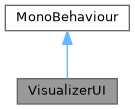
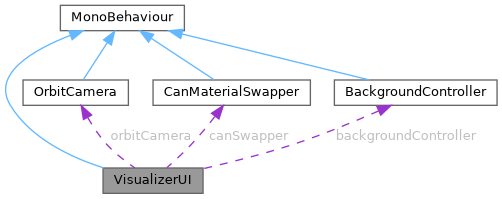
Connects Unity UI buttons and TextMeshPro labels to the three scene controllers. More...
Public Attributes | |
Scene Controllers | |
| OrbitCamera | orbitCamera |
| Reference to the orbital camera. Drives rotation toggle and reset. | |
| CanMaterialSwapper | canSwapper |
| Reference to the can material swapper. Drives brand cycling. | |
| BackgroundController | backgroundController |
| Reference to the background controller. Drives scene preset cycling. | |
Buttons | |
| Button | autoRotateButton |
| Toggles OrbitCamera auto-rotation on/off. | |
| Button | nextColorButton |
| Advances to the next can brand variant. | |
| Button | prevColorButton |
| Steps back to the previous can brand variant. | |
| Button | nextBgButton |
| Cycles to the next studio background preset. | |
| Button | resetCameraButton |
| Resets the camera to its default framing. | |
Labels | |
| TextMeshProUGUI | variantLabel |
| Displays the current brand name, e.g. "Brand: Coca-Cola". | |
| TextMeshProUGUI | backgroundLabel |
| Displays the current background preset name, e.g. "Scene: Dark Studio". | |
| TextMeshProUGUI | rotationLabel |
| Displays the current auto-rotation state, e.g. "Auto-Rotate: ON". | |
Detailed Description
Connects Unity UI buttons and TextMeshPro labels to the three scene controllers.
All button references and controller references are injected by ProductVisualizerSetup at edit-time, so no manual Inspector wiring is needed when running the setup tool.
- Controlled systems
Button Action autoRotateButton OrbitCamera.ToggleAutoRotate() nextColorButton CanMaterialSwapper.NextVariant() prevColorButton CanMaterialSwapper.PreviousVariant() nextBgButton BackgroundController.NextPreset() resetCameraButton OrbitCamera.ResetView()
- Label updates
- Labels are refreshed reactively via the OnVariantChanged and OnPresetChanged delegates exposed by CanMaterialSwapper and BackgroundController respectively.
Definition at line 29 of file VisualizerUI.cs.
Member Data Documentation
◆ autoRotateButton
| Button VisualizerUI.autoRotateButton |
Toggles OrbitCamera auto-rotation on/off.
Definition at line 59 of file VisualizerUI.cs.
◆ backgroundController
| BackgroundController VisualizerUI.backgroundController |
Reference to the background controller. Drives scene preset cycling.
Definition at line 46 of file VisualizerUI.cs.
◆ backgroundLabel
| TextMeshProUGUI VisualizerUI.backgroundLabel |
Displays the current background preset name, e.g. "Scene: Dark Studio".
Definition at line 87 of file VisualizerUI.cs.
◆ canSwapper
| CanMaterialSwapper VisualizerUI.canSwapper |
Reference to the can material swapper. Drives brand cycling.
Definition at line 43 of file VisualizerUI.cs.
◆ nextBgButton
| Button VisualizerUI.nextBgButton |
Cycles to the next studio background preset.
Definition at line 68 of file VisualizerUI.cs.
◆ nextColorButton
| Button VisualizerUI.nextColorButton |
Advances to the next can brand variant.
Definition at line 62 of file VisualizerUI.cs.
◆ orbitCamera
| OrbitCamera VisualizerUI.orbitCamera |
Reference to the orbital camera. Drives rotation toggle and reset.
Definition at line 40 of file VisualizerUI.cs.
◆ prevColorButton
| Button VisualizerUI.prevColorButton |
Steps back to the previous can brand variant.
Definition at line 65 of file VisualizerUI.cs.
◆ resetCameraButton
| Button VisualizerUI.resetCameraButton |
Resets the camera to its default framing.
Definition at line 71 of file VisualizerUI.cs.
◆ rotationLabel
| TextMeshProUGUI VisualizerUI.rotationLabel |
Displays the current auto-rotation state, e.g. "Auto-Rotate: ON".
Definition at line 90 of file VisualizerUI.cs.
◆ variantLabel
| TextMeshProUGUI VisualizerUI.variantLabel |
Displays the current brand name, e.g. "Brand: Coca-Cola".
Definition at line 84 of file VisualizerUI.cs.
The documentation for this class was generated from the following file:
- UnityVisualizer/Assets/ProductVisualizer/Scripts/VisualizerUI.cs